Manual de Usuario
Guía de configuración para la nueva versión de Paw Tag
Estas instrucciones son para la nueva versión (Wireless Tag) con soporte para Google Find Hub y Apple Find My.
Compatibilidad Dual
Compatible solo con Android 9+. No soporta dispositivos Huawei.
Una vez emparejado, el tag se bloquea a esa cuenta.


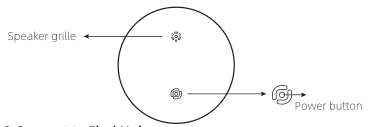
Diagrama de botones y altavoz
Apple Manual (Apple Find My)
1. Getting Started
To prevent accidental shutdowns...
1.1 Power On / Off
- Power On...
- Power Off...
Remark: Setting a shutdown timer...
1.2 Check For Updates
To use Find My app...
2. Add Your Locator
2.1 Start the App
Open app, allow notifications.
2.2 Connect your Locator
Power on, select items...
3. Function Introduction
- 3.1 Locate Your Item Play sound...
- 3.2 Notifications Left behind alert...
- 3.3 Share Items Share with friends...
- 3.4 Lost Mode Enable lost mode...
- 3.5 Remove Item Remove in app...
- 3.6 Factory Reset Your Locator Restore settings...
- 3.7 Unwanted Tracking Detection Antiharrasing alert...
4. Specifications
5. Alternative Button Functions (Summary)
- Power on...
- Power off...
- Learn more...
- Reset...
7. FAQ
Anonymously reports...
Try switching networks...
Android Manual (Google Find Hub)
1. Log in Google Find Hub APP
- Search app...
- Install or update...
- Open app...
- Log in Google...
- Permissions...
2. Power on
Holdcircular button 3s...
3. Connect to Find Hub app
- Bluetooth on...
- Bring close, wait pop-up...
4. Product Introduction
4.1 Nearby Finding
- Indicate signal...
- Play Sound...
- Hey Google assistant...
4.2 A community for finding
Community network...
4.3 Enable Lost Mode
Enable lost mode on Android...
4.4 Location Sharing
Share location...
4.5 Unknown tracker alerts
Anti tracking alerts...
4.6 Privacy
End-to-end encrypted...
5. Button Function & Settings
- 5.1 Power on Press 3 seconds...
- 5.2 Power off Hold 3 seconds...
- 5.3 Restore factory settings Click reset process...
7. Troubleshooting (FAQ)
- Method 1: Restart Bluetooth...
- Method 2: Reset tag...
- Method 3: Restart phone...
- Method 4: Update software...
- Method 5: Settings steps...
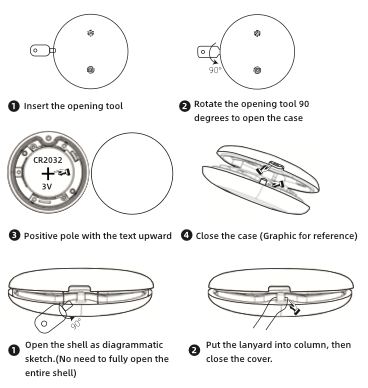
6. Battery and Lanyard Replacement
- Insert opening tool...
- Rotate opening tool...
- Use fingernails...
- Replace battery...
- Put lanyard and close...
Diagrama de reemplazo de batería y correa
Warnings & Safety Information
FCC Statement
This device complies with part 15...
Note: This equipment has been tested...
Made in China